

Hooks 系统
用 Hooks 在 Claude Code 生命周期里自动跑你自己的规则,洛洛版讲解
hihi,洛洛又来了。
这篇要讲的东西叫 Hooks,洛洛第一次听到的时候以为是钩子毛线的那种钩针。
后来默子老师给我解释:就是在 Claude Code 干活的固定节点上,塞一段你自己的脚本,让它必须跑、一定跑、每次都跑。不靠模型自觉,靠规则。
souga,原来是这样。所以它不是"跟 AI 商量一下能不能每次都帮我格式化",而是"你没得选,写完文件就格式化"。
Hooks 是 Claude Code 的生命周期脚本。它适合做确定性的项目规则,例如格式化、审计命令、阻止敏感文件读取,而不是再让模型临场猜应该怎么处理。
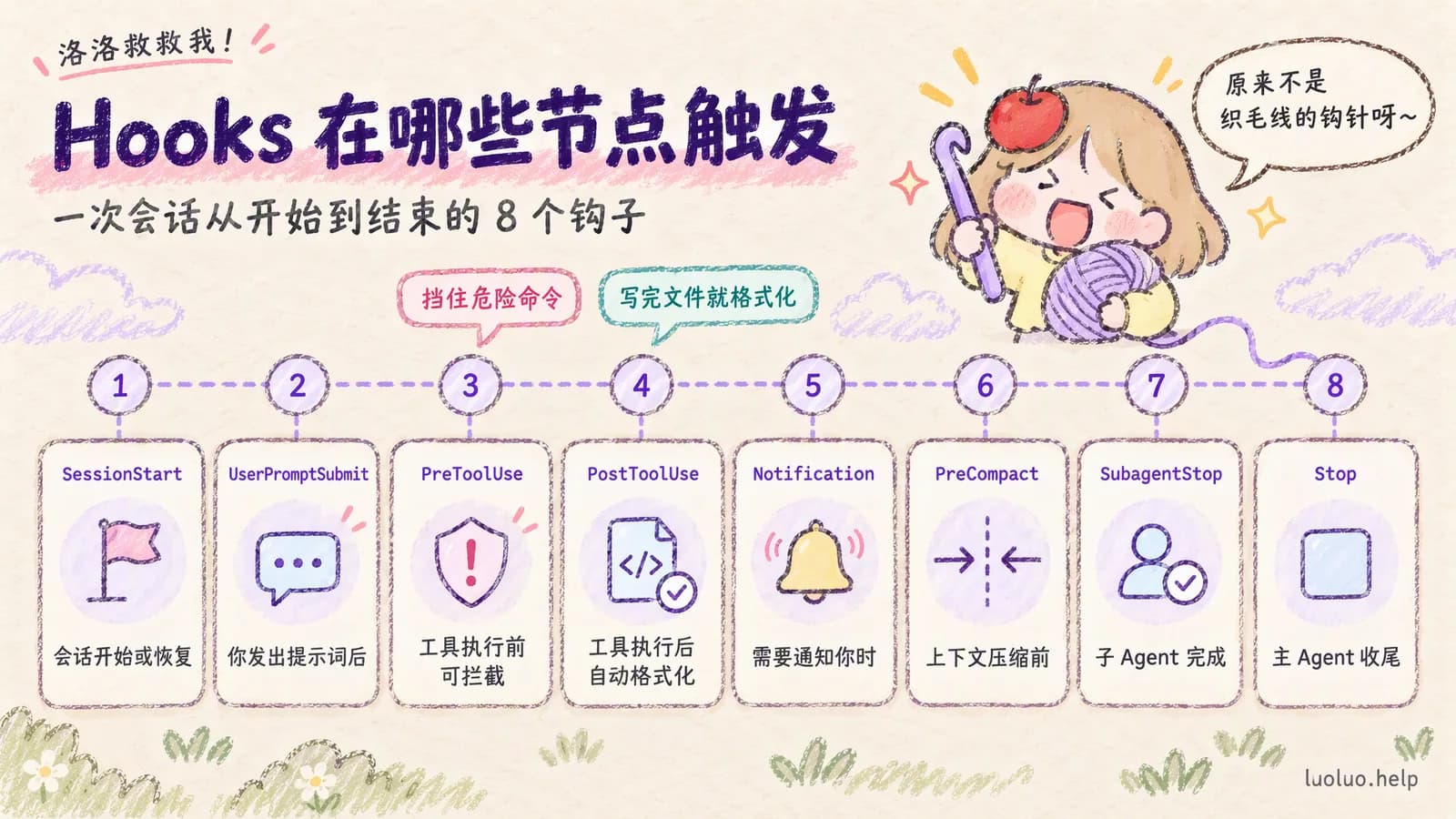
常用事件
先看一眼有哪些节点可以插。洛洛看这张表的时候是一脸懵的,但看完之后大概明白了:从会话一开始到最后收尾,每个环节都留了口子。
| 事件 | 触发时机 | 常见用途 |
|---|---|---|
SessionStart | 会话开始或恢复 | 注入本机上下文、检查环境 |
UserPromptSubmit | 用户提示词提交后 | 拦截敏感请求、补充上下文 |
PreToolUse | 工具执行前 | 阻止危险命令、要求确认 |
PostToolUse | 工具执行后 | 自动格式化、记录审计日志 |
Notification | Claude 需要通知用户 | 桌面提醒、IM 通知 |
Stop | 主 Agent 完成响应 | 收尾检查、总结状态 |
SubagentStop | 子 Agent 完成响应 | 汇总子任务状态 |
PreCompact | 上下文压缩前 | 保存关键信息 |
具体事件会随 Claude Code 版本扩展(截至 2026-09-14 官方已列出 30 多个,比如 SessionEnd、PermissionRequest、PostCompact),最终以 /hooks 菜单和官方文档为准。
配置结构
知道有哪些节点了,接下来是怎么写进去。这里就是洛洛最想哭的部分,因为它是 JSON。
Hooks 写在 settings.json 的 hooks 字段下。每个事件对应一个数组,数组里可以配置 matcher 和真正执行的 hooks。
{
  "hooks": {
    "PostToolUse": [
      {
        "matcher": "Edit|Write",
        "hooks": [
          {
            "type": "command",
            "command": "python3 .claude/hooks/format-written-file.py"
          }
        ]
      }
    ]
  }
}
注意这里是内层的 "hooks" 数组,不是旧版草稿里常见的单个处理器对象。
洛洛老实说:这个结构洛洛看第一眼是不懂的,外面一个 hooks 里面又一个 hooks,套娃之。但照着抄真的能跑,抄的时候记得数好括号就行。
洛洛碎碎念
JSON 少一个逗号、多一个逗号,整份配置直接不生效!!!
洛洛在这里卡了半小时,一直以为是自己脚本写错了,最后发现是最后一项后面多打了个逗号。害怕之。
实在不确定的话,找个 JSON 校验的网页贴进去看一眼,比自己盯着数括号快多了。
交互式配置
其实!有不用手写 JSON 的办法!洛洛知道这个的时候拍桌子了。
在 Claude Code 中输入:
/hooks截至 2026-09-14 官方文档已改为:/hooks 是只读的浏览菜单,用来查看每个事件下配了哪些 Hook、来自哪个文件;要新增或修改,直接让 Claude 帮你改 settings JSON。对团队项目来说,让 Claude 生成后再把最终配置整理到项目级 .claude/settings.json,比自己手写整段 JSON 更稳。
Command Hook
菜单帮你生成的东西,本质上就是下面这一小块。
当前最常用、也最容易版本兼容的是 command hook:
{
  "type": "command",
  "command": "python3 .claude/hooks/check-bash.py"
}
Hook 命令会通过 stdin 收到一段 JSON,里面包含事件名、工具名、工具输入等上下文。复杂逻辑建议放进脚本里解析 JSON,不要把很长的 shell 管道塞进 settings.json。
翻译成洛洛能听懂的话:Claude Code 会把"我现在正在干什么"打包成一张纸条递给你的脚本,脚本自己拆开看。所以复杂判断都写在脚本里,配置文件只负责说"跑这个脚本"。
Matcher
matcher 用来限制 Hook 对哪些工具生效:
"Bash":匹配 Bash 工具"Edit|Write":匹配编辑和写入"Read|Grep|Glob":匹配只读工具"mcp__github__.*":匹配某个 MCP server 的工具
PreToolUse 和 PostToolUse 通常需要 matcher;会话类事件可以不写 matcher。
洛洛的理解是:matcher 就是筛子。不写筛子,它对所有工具都触发,连读个文件都要跑一遍你的脚本,慢死。
示例
理论说完了,直接上洛洛看得懂的三个场景。这三个配置洛洛都是原样抄的,能跑。
写文件后格式化
{
  "hooks": {
    "PostToolUse": [
      {
        "matcher": "Edit|Write",
        "hooks": [
          {
            "type": "command",
            "command": "python3 .claude/hooks/format-written-file.py"
          }
        ]
      }
    ]
  }
}
脚本里可以从 stdin JSON 取出被写入的文件路径,只对支持的后缀运行格式化器。这样比依赖 $FILE 这类隐式环境变量更可靠。
执行命令前审计
{
  "hooks": {
    "PreToolUse": [
      {
        "matcher": "Bash",
        "hooks": [
          {
            "type": "command",
            "command": "python3 .claude/hooks/check-bash-command.py"
          }
        ]
      }
    ]
  }
}
这类脚本适合阻止:
git push --forcerm -rf- 生产数据库迁移
- 上传
.env、私钥、证书 - 没有测试保护的发布命令
这个列表洛洛是看着后背发凉的。上面每一条,只要有一次手滑就够你哭一整晚。默子老师说过,能用规则挡住的事情,就不要指望自己当时清醒。
会话开始时检查环境
{
  "hooks": {
    "SessionStart": [
      {
        "hooks": [
          {
            "type": "command",
            "command": "python3 .claude/hooks/session-start.py"
          }
        ]
      }
    ]
  }
}
可以在这里检查 Node、pnpm、Python、当前分支、未提交改动等环境信息,再把结果打印给 Claude。
返回结果
最后一个概念:脚本跑完了,怎么告诉 Claude Code "过"还是"不过"。
不同事件支持的返回语义不完全一样。实务上可以按这个原则设计:
- 退出码
0表示通过;退出码2表示阻断,stderr 会交给 Claude;其他非零退出码算非阻断错误,只提示一下,操作照常继续 PreToolUse:可以阻断工具调用,适合安全策略- 需要精细控制时:优先使用官方支持的结构化 JSON 输出,而不是只靠 stderr 文案
Hook 是确定性自动化,不是权限系统的替代品。高风险操作仍然应该配合 permissions.deny、permissions.ask、沙盒和人工确认一起使用。
洛洛碎碎念
这句"不是权限系统的替代品"洛洛一开始跳过去了,后来才反应过来它在说什么。
Hook 是你自己写的脚本,写漏了它就漏了。真正的红线要在 permissions 里也堵一遍,两层一起上。
安全这块洛洛真的是纯外行,所以官方原话怎么说洛洛就怎么记,一个字都不敢改。
洛洛的总结
Hooks 说白了就是:把你嘴上反复叮嘱的那几句话,变成一段电脑必须执行的脚本。
洛洛现在写代码不多,但把"写完自动格式化"配上之后,那种再也不用管的感觉,牛逼之。
想让 Claude 记住的东西不止规则,还有项目本身长什么样,那种事情要写进CLAUDE.md 配置,下一篇就是它。
洛洛先去补个觉,昨天数括号数到三点。
参考来源
查阅日期 2026-09-14。
- Hooks 参考:https://code.claude.com/docs/en/hooks
- Hooks 入门指南:https://code.claude.com/docs/en/hooks-guide